
ASUS Story1.10.20130329 - Get APK
You'll be able to download in few seconds.
Publisher Description
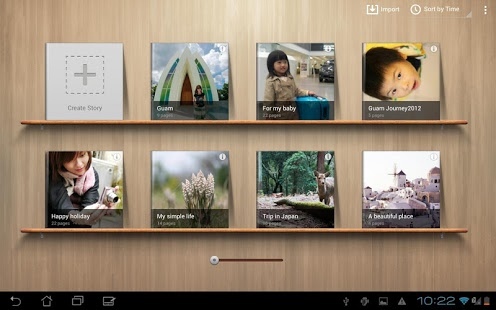
Photos are a treasure trove of memories, capturing all those wonderful moments that provide a glimpse into an individual’s life. Let others catch a glimpse of your life with ASUS Story!
ASUS Story lets you collect and group your memorable photos into one insightful story that you can share with family and friends. With ASUS Story, you can:
- Create a photo album that captures all your wonderful moments.
- Select a layout that automatically fits the photos’ aspect ratio and capture date, and chronologically sort your photos.
- Flip through the digital pages like a physical photo album.
- Create a bookshelf of for your albums that allows instant access to your memories.
- Create a map to tag the locations where the photos were taken, sharing your footprints around the world.
- Write a story for your photos.
- Use hand gestures to adjust the photo size and move the photo on the same interface, allowing you to enjoy the fun of editing.
- Sort the photos and move them between pages in the most intuitive way.
- Navigate between folders and select photos using the specially-designed work area.
- Share your photo story on Facebook, Google+, Picasa, WebStorage, Dropbox and SkyDrive.
*Note: If you experience any non APP related issues on your ASUS device, please contact ASUS technical support team at http://vip.asus.com/VIP2/Services/TechQuery
About ASUS Story
The company that develops ASUS Story is ASUSTek Computer, Inc.. The latest version released by its developer is 1.10.20130329.
To install ASUS Story on your Android device, just click the green Continue To App button above to start the installation process. The app is listed on our website since 2013-06-17 and was downloaded 0 times. We have already checked if the download link is safe, however for your own protection we recommend that you scan the downloaded app with your antivirus. Your antivirus may detect the ASUS Story as malware as malware if the download link to com.asus.story is broken.
How to install ASUS Story on your Android device:
- Click on the Continue To App button on our website. This will redirect you to Google Play.
- Once the ASUS Story is shown in the Google Play listing of your Android device, you can start its download and installation. Tap on the Install button located below the search bar and to the right of the app icon.
- A pop-up window with the permissions required by ASUS Story will be shown. Click on Accept to continue the process.
- ASUS Story will be downloaded onto your device, displaying a progress. Once the download completes, the installation will start and you'll get a notification after the installation is finished.
Program Details
System requirements
Download information
Pricing
Version History
version 1.10.20130329
posted on 2013-06-17
- Fixed several bugs,- Increased page flipping detection area.,- Album thickness changes visually while browsing.,- Added "Export" feature, for exporting edited album pictures to local storage.,- Added social sharing support for Facebook,- Added "Preload thumbnail" option
version 1.10.20130329
posted on 2013-06-17
Several fixes and updates
Disclaimer
External Download
We do not host ASUS Story on our servers. We did not scan it for viruses, adware, spyware or other type of malware. This app is hosted by Galad and passed their terms and conditions to be listed there. We recommend caution when installing it.
The APK Download link for ASUS Story is provided to you by apps112.com without any warranties, representations or guarantees of any kind, so access it at your own risk.
If you have questions regarding this particular app contact the publisher directly. For questions about the functionalities of apps112.com contact us.
